TopBanner

Video of What’s New in Windows 8.1 April 2014 Update


Below is my very quick update on what’s new in the next (April 2014) Windows 8.1 Update:

Microsoft continues to improve Metro/Modern vs desktop experience

  • Metro apps have a title bar, with close/minimize buttons and the ability to “Split left/right” when you right-click it.
  • You can keep taskbar visible while using modern apps
  • Control Panel item in metro PC Settings
    200% and 250% DPI scaling modes added to control panel (in 8.1 RTM, to get these values you have to go “custom”), 250% is the default on screens with more than 1800 vertical lines
  • Shutdown button on the start screen*, doesn’t show on less than 8″ tablets to prevent accidental shutdown
  • Search button on the start screen*
  • Instead of metro bars (top and bottom) a context menu appears when you right-click an app on the start screen*
  • Pinning metro apps to desktop taskbar*
    Internet Explorer Enterprise Mode

snom UC Edition Demo’s Coming Features: Meeting Join, Roster, & User Photos


snom UC Edition demo’s BTOE, Meeting Join w/Roster, 802.1x, user Photos. Scheduled for Q2 2014

An Update on Audiocodes 440HD, 430HD, 420HD Lync Phone Series

IMG_20140218_111820

Audiocodes has been working at the Lync firmware for their new 4xxHD Series of IP phones. In September 2013 the entry level 420HD phone achieved Lync Qualified status. (see my review here)

I was interested to see the progress Audiocodes was making on their Lync line up, especially the high end 440HD model (which sports a unique button plus LCD arrangement) and their Better Together over Ethernet functionality. Recently at Lync Conference 2014 Alan Percy and Ran Inbar gave me a short tour of what Audiocodes has in store for the future.

Below is video demo with Audiocodes CTO Ran Inbar:

I suggest to click close caption for better text

Audiocodes Better Together over IP

Audiocodes implementation of BToE will not require the controlling PC to be physically plugged into the Audiocodes 4xxHD phones’ switch. (snom UC Editon does not either, Polycom VVX does) It was noted that the IP phone will generate a unique Pin code that will be used initially to pair the phone and PC.

IMG_20140218_112055

BToE on Audiocodes is slated to support

  • sign-in assist
  • call control like click-to-dial, hangup, hold, etc

Will not support video calls with phone providing audio portion of call.

Audiocodes 440HD Desi-Less Lync Contact Buttons

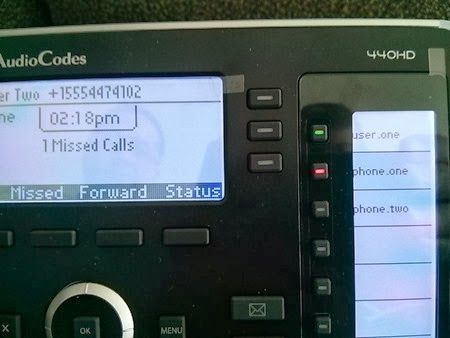
The clever DESI-less buttons on the 440HD will be assigned by adding a Lync contact to a Lync contact list. It was indicated to me that the contacts will be listed in alphabetical order like in the Lync client itself. If a user sets up a user definable button from the 440HD phone itself, the button will be added to the Lync client contact list as well.
IMG_20140218_111820

As you can see in the photo above the buttons are tri-color LED (red, green, blue) lit and correspond roughly to Lync presence colors. The mono LCD is backlit and at this time seems to show the contact name.

Other Items

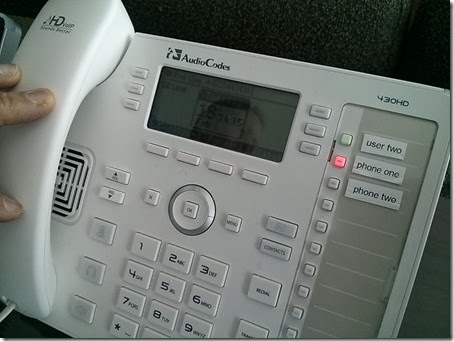
In a move that is not common with other vendors, Audiocodes plans to have white and black versions of the Audiocodes 4xxHD to accommodate different scenarios.

(Below you can see that the white version means that BLF button light up as a whole compared to black version)
IMG_20140218_111508

It appears that there will be two different SKU fors the Audiocodes 4XXHD series:

  • UC420HD / UC430HD / UC440HD will be preloaded with Lync Firmware
  • IP420HD / IP430HD / IP440HD will be preloaded with SIP Firmware

Other options will be white/black or power supply/non.

<end>

Other Links:
My Review of Audiocode UC420HD (Lync Features) click here

snom 715 First Impression Review: Gigabit & USB Added

IMG_20140303_092939

The new snom 715 is an enhanced version of the snom 710 so if you have seen the 710 you are already quite familiar with the 715.  The 715 brings several new features/enhancements: gigabit network switch, USB peripheral/add-on interface and RTAudio wideband to an IP handset set at $139MSRP.


snom 715

snom 710

GB switch

X

 
USB

X

 
RT Audio Wideband

X


A video review of the 710 below (NOTE: be aware of differences noted above!)

A comparison of the side mounted USB port

IMG_20140303_092811

Close up of USB port (which is mounted on the side like one of the snom 760 USB ports as opposed to near the Ethernet ports like the snom 720—apparently the side mounted USB is the future)

The blue tooth port can be used for WLAN or Bluetooth headset connectivity. (I did not test)

IMG_20140303_092817

I could see no different in the appearance of the Gigabit switch on the 715 and the 10/100 switch on the 710. (There are no indicator lights on either—which some people see as a enhancement since on some older snom models they had indicators which in dimly light office shown down on the desk)

IMG_20140303_092909

The screen resolution (same as 710 and 720)

IMG_20140303_134015

Some observations

  • The LED’s are much more brilliant on the 715 than the 710 (at least on hardware I have)
  • The snom 715 (as all snom models) does not include power cord

Pros

  • Well built, low cost device (lowest cost Gigabit Lync phone at $139MSRP, compared to Audiocodes 420HD at $149 and Aastra 6721i)
  • snom UC Edition: very full featured Lync firmware stack: click here (FW not available at this time)
  • 5 dedicated definable buttons

Cons

  • If you need things like more than 4 accounts/identities, tri-color Lync Presence indicating buttons or more user definable buttons you may want to look at the snom 720/760
  • DESI labels may be a bit tricky to print?

Note: Qualification/Firmware Status of snom 715 as of 3/3/2015

  • Not currently listed as a Lync Qualified device: click here
  • Currently no UC Edition firmware list on snom website: click here

While the snom 715 does not currently have Lync firmware released, it looks set to bring a sizable feature list, Gigabit switch performance and current and future peripheral connectivity via the new USB port to the low end of Lync capable IP Phones. It also looks set to become the lowest cost device while bringing 5 user definable buttons.

<end>

715 webpage click here
715 Datasheet click here
715 Docs: click here

Chronicling the Progress of Microsoft’s “Top Secret”, Free “Windows Cloud OS”

image

I’ve written before (8/12 here, 7/13 here) that Microsoft seems to be stealthily, or at least without much fan fare, creating a kind of “Microsoft Windows Cloud Edition” without much notice in the form of the tightly integrated and free www.OneDrive, OfficeOnline apps Online and www.Outlook.com.

My argument is that while the industry hardly notices, Microsoft already largely has a “cloud OS” that consists of:

    • Very simple “Start” menu (with Live Tiles)
    • File Storage (Hardrive) in Skydrive 
    • File Sharing (even public file sharing with editing!)
    • Office Apps
      • Word
      • Excel
        • Excel/ Webbased Surveys
      • Powerpoint
      • Onenote
      • Outlook: contacts, calendar, email
    • Photo viewer
    • Notepad (advanced features)
    • Outlook.com
      • Email (not only the client but the service as well!)
    • Communication: Audio/Video, Presence & Instant Messaging Powered by Skype
      • Skype IM/P
      • Along with Gmail IM capabilities
    • Skype Audio/Video calling in the browser Click Here
    • This web OS easily sync’s with Windows, WindowsPhone, iPhone, Android

What is the latest addition to “Microsoft Windows Cloud OS”?

  • More shortcuts to the “Start” menu
  • Ability to add new document from the “Start” menu
  • Office templates

image

The “Start” menu is current at the top of the screen instead of taking the whole screen but this could easily be remedied.

Currently the “Start” button looks like a Down caret/arrow:

image

image

image

But this could easily be turned into a Windows 8.x like “Start” Icon at the button of the screen, which would much more graphically indicate it’s Start-like purpose, as shown in the mockup below: (NOTE—this is a mockup screen, but obviously would take negligible amount of time to implement)

image

The new shortcuts mean you can open new documents or templates from the “Start” menu with one click:

image

You can now utilize Office online templates

image

When you are in templates, note the Office option.

image

There are some ways we could say the service is not a complete OS because of the lack of:

  • Configurable and complete Start menu
  • Ability to install additional apps
  • Printer management?

whether this is Microsoft Window Cloud Edition OS or just a really handy, free web service, you can go out and get it right now. Sign up at: www.onedrive.com