TopBanner

Showing posts with label polycom. Show all posts

Lync Qualified/Comptabile and Optimized IP Phone Features Compared: Which Devices are More “Advanced”?

image

I am getting more and more questions on which class of Lync devices is more “advanced”. As Lync Qualified (aka Lync Compatible/ 3PIP) devices get more and more features this question is getting less and less clear. Will Lync Qualified devices become more “Optimized” than LPE devices? This is a real possibility.

At one time I would have said Optimized devices are the information worker device while Qualified/Compatible are for those that want a more PBX-like experience. Qualified/Compatible/3PIP devices certainly remain the devices that provide the most PBX-like experience, but with the addition of Better Together over Ethernet, USB/Bluetooth headset support and video right from the devices (Polycom VVX 500/600), this line has become blurred. I still think that (at this moment) the information worker is best served by LPE devices, but this is becoming more subjective and will likely to change in the future.

Some things that still weigh in favor of LPE in my mind:

  • Less initial setup /provisioning “fiddling”
  • Better Lync Monitoring server Media Quality reporting (basically there is non on Qualifed/Compatible devices)
  • LPE firmware is more “settled”,hardened & bug free.

NOTE: This article is in progress. Also, if you see any errors/omissions, please comment. Please verify and do your own testing.


snom UC Edition

Polycom UCS 5.0.0

Audiocodes 4xxHD LPE “Aries”
  Qualified Qualified Qualified(8) Optimized
Boss/Admin X X    
BToE (Ethernet Better Together) Beta X    
USB Better Together       X
Call Park X X   X
1 Button Call Park X X    
Parked Call Timer   X    
Lync Server FW Updates X X   X
Lync Address Book Search X X   X
Lync Address Book X     X
See Contact’s Lync Note X     X
ABS Other Contacts Methods X      
Lync Contact Photos (10)     X
Monitoring Server Media Details       X
Lync Server Setting Provision X(5)      
Device MOH X     X
Change Device MOH X(6)      
Transfer Directly to VM X      
1 Touch Contact Buttons X X    
Safe Transfer via 1 Touch Button X      
Visual Voicemail       X
Video from phone   X(1)    
Supports Video Call Escalation       X
Safe Transfer X      
2 Button transfer X X    
Expansion Module X X(2)    
DESI Less BLF Buttons some(7) X    
Define buttons from handset X   X  
Phone “In a Call” on handset lift X X X  
Dedicated “My Presence” Light       X
Support for USB/BT Headset X(3) X(3)    
PC Port deliver non-default VLAN X X    
Intercom – Auto pickup, 2 way X(4)      
Skype Federation audio calls X      
Disable 2nd Call  audio alert X      
Adaptable RTAudio codec Narrow X     X
RTAudio Wideband X     X
View Outlook Calendar (10) X   X
1 Click Meeting Join (10)     X
Lync Meeting Roster Display (10)     X
Initiate Lync Meeting from phone (10)     X
DR Pool Failover without Reboot X     X
SBC + WAN Loss Scenario (9)     X


1) VVX 500/600 with optional camera, to Lync 2010 client only.
2) Announced, but not here.
3) Some models
4) Works, but not certified feature. Click Here
5) Snom marketing: Click Here; Technical Details Click Here
6) Possible, but not manageable from Lync Click Here
7) snom 760 and 821 have 4 DESI-Less Buttons
8) Only Audiocodes 420HD Lync Qualified as of this article: Click Here
9) as of 3/14 snom has addressed scenario, but FW to be released.
10) as of 3/14  snom UC Edition has demo’d but not yet released this feature: Click Here

More on Lync Phone Edition:
http://windowspbx.blogspot.com/2012/07/feedback-from-field-challenges.html

Another Device Comparison:
http://masteringlync.com/2012/10/25/lync-device-showdown/

Contributions/Credits/Assistance:
https://twitter.com/JonathanSteeman

First Picture of #Polycom CX5500 “Roundtable”IP #Lync Video & #SIP Audio Conference Station With It’s “CPU”


We have written about the CX5100 (USB)/CX5500 (IP) “Roundtable” devices before, but Graham Walsh posts the first picture of the Polycom CX5500 (SIP and Lync) IP video conference device with what appears to be the CPU beside it.

The CX5500 Unified  Conference Station, unlike the original “Roundtable” and it’s little sibling, the CX5100, is a standalone IP device that does not require a PC.

image

It appears that the CX5500 “CPU” has matching look: black with chrome, silver and red trim. (In a sense the CX5500 appears to be a CX5100 with touchscreen control and a “small PC” added)

image

Some of the known Polycom CX5500 Unified Conference Station’s features:

  • 1080p 30fps HD 360 degree Video
  • (5100 USB Only or 5500 as complete conference phone)
  • SIP HD Audio conference explained Click Here
  • New CX5500 Will Have a Touch Screen Interface (Click here)
  • Can optionally be Integrated with Lync Room System
  • Custom built for Lync 2013
  • Device physical design revamp from original “Roundtable”
  • “An all-new user interface”
  • New The CX5500 can be a “fully featured SIP conference phone”
    • So if you are not using Lync you can still use the CX5500 for audio conference (Click here)

Source:
https://twitter.com/Graham_Walsh/status/378104371692990464

#Polycom Announces & Demos UC Software 5.0 #Lync Features: Big Update for Lync!


image

Polycom has just release video demo’s of its new UC Software 5.0 which appear to bring a lot of big, new features to their Lync Qualified devices. Below are the demo’s with some of my commentary below.

Most of the demos are done on the VVX500/600 form factor (touch screen, not BLF buttons) I’d be very interested to see how some of the features work on the VVX3xx/4xx as I suspect they will be the “bread & butter” of future Polycom voice implementations.

At the moment the UC Software 5.0 does not appear to be listed on Polycom Support. Click Here.
UPDATE 9/6/13: Jeff Schertz notes with tweet: “It’s out” (UCS 5.0.0). You can get the updates here.

image

New UCS 5.0.0 Lync Features and My Commentary

Boss/Admin

My notes:

  • Since there are not hard line buttons on vvx500/600 the Boss has to press and hold to pickup a call the admin took for him

Devices Update

Device Update Notes:

  • The graphical Reboot, Cancel Details is excellent
  • Ability to set reboot delay time is a nice touch

Directory Search

My Directory Search Notes:

  • I don’t see the Lync note in the contact details screen
  • Can only work number be called?

Better Together over Ethernet

Better Together over Ethernet Notes:

  • This feature is one of the most anticipated features on Lync Qualified devices
  • Interesting to see a Polycom Better Together app is required
    • from the video it is not clear if this app is just for pairing or required at all times
    • See my in-depth article on Better Together over Ethernet Pairing: Click Here
  • In the youtube description it is noted that the VVX can act as an Audio Playback Mode (emulates a USB audio device)
    • This means we could expect escalate to video to work (this was less clear before)

Call Park

My Notes

  • Interesting to note this is not one touch on VVX 500/600
    • More | Park

UCS 5.0.0 Downloads

UCS 5.0.0 Firmware: Click Here
UCS 5.0.0 Release Notes: Click Here

Step By Step Upgrade Installation Guide

http://d1it.wordpress.com/2013/09/06/polycom-btoe-1/

To see all of PolycomVideo channel: click here.
To get updates for you phone click here.

How Will Lync Enhanced Better Together over Ethernet Pairing Process Work?

In May 2013 we reported that several Lync qualified vendors (Snom, Polycom, Audiocodes) started mentioning future “enhanced better together support over ethernet” functionality. At the Microsoft World Wide Partner 2013 both snom and Polycom demonstrated this functionality. Interestingly snom is calling this functionality “Enhanced Better Together” (or EBT) and Polycom is calling it “Better Together over Ethernet (or BToE).

The remaining question I’m hearing from Lync consultants, admins and partners: How will the Lync Client to IP pairing process work? This is a very valid question as the usability at scale and ongoing manageability of this feature will be key to its successful implementation. (There are Lync Call Via IP Phone apps already. See Call Via Phone and Click Here)

UPDATE 9/6/2013: Polycom Has Just Released a Detailed Step by Step How Their BToE Will Work:

how Polycom better together pairing process works
What Piece Technically Connects Lync Client and Lync Qualified IP Phones?

During my interview with snom’s Paul Jamieson about snom’s new Enhanced Better Together feature when I asked about the pairing process he noted that the feature was still a work-in-progress [for snom] and he didn’t have technical details to share. To my question “Is there anything a user needs to do to pair?” Paul noted that “today yes, when certified it will be more plug and play. There will be no external application to be installed.

On Lync 2010 + snom
EBT on lync 2010

Lync 2013 + polycom (photo via @Alxlvanov)
image

After seeing the Lync audio devices screenshots (above) from the snom & polycom Enhanced Better Together over Ethernet demo’s at WPC13, I highly suspected a USB to Ethernet driver was the piece bridging Lync and the IP phones. A conversation with a Polycom UC architect Adam Jacobs verified that at this time “all vendors will require a client side USB to Ethernet handler…that is a USB to Ethernet HID driver and this will come as an [installer] package.”

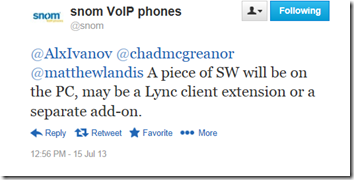
Update 7/15/13: @snom notes: “A piece of SW will be on the PC, may be a Lync client extension or a separate add-on.”

image

I would comment that using a USB to Ethernet driver is a very good move which means that Lync Qualified devices with “Enhanced Better Together over Ethernet” from a Lync user interface perspective will work very similar to existing Better Together integration to Lync.

How will a specific IP phone be paired with the Lync client?

In the Polycom solution “the IP phone is automatically located via the integrated switch by the Lync client”. This seems to indicated that using the languague “tethered” may still be accurate when talking about better together over ethernet.

It does bring up some questions and thoughts:

  • Does this mean that only the Lync client on the PC plugged into the phone integrated switch *can* connect to that phone? (or is there some manual override?)
  • What ramifications does this hold for virtualized desktops?
  • It does seem that integrated switch has jumped up a notch in importance and getting 1GB could be more important. (VVX 3xx and 4xx has both GB and 100MB models)

image
for Polycom the PC Port will bind this phone to the Lync Client.

Below is a great video with Adam Jacobs, Polycom UC Architect and fellow Lync MVP, demonstrating the provisioning and tether pair process.

[NOTE: No input from snom on this functionality at this time.]

Will My Lync SDK Customizations Work With EBToE?

I haven’t tested this new functionality yet, but from my own usage of the Lync SDK (Lync client sdk) and the fact that EBToE is using a device driver (just like all previous Lync audio devices) I think we can safely extrapolate that your Lync SDK apps will work with enhanced better together over Ethernet.

There could be cases where a Lync Qualified device does not support (or does not yet support) some feature that the Lync SDK supports. This is already the case with the Lync Phone Edition “Aries” device: It does not support (the LPE “Areies” hardware" does not support) the ability to “safe transfer” and so if you request a “safe transfer” via the Lync SDK it will fallback to doing a normal transfer. I would expect we could expect possible similar “limitations” with EBToE devices.

In Summary

  • a USB to Ethernet HID driver connects Lync client and IP phones with this feature
  • This has been demonstrated to work on bother Lync 2010 and Lync 2013
  • This means Better Together over Ethernet should work like USB Better Together from UI perspective
  • Application utilizing Lync Client API Should work with Better Together over Ethernet
  • Administrator work: Install USB-Ethernet Handler package
  • (for Polycom at least) Just plug your PC into the Phone PC Port for pairing

<end>


If you want to see snom and Polycom Better Together Over Ethernet Demo’d:
http://windowspbx.blogspot.com/2013/07/my-first-look-at-snom-uc-edition.html
http://windowspbx.blogspot.com/2013/07/polycom-vvx-series-getting-new-lync.html


snom on pairing
http://youtu.be/8SbWtMGADL0?t=1m10s

What does user need to do to pair?
http://youtu.be/8SbWtMGADL0?t=6m25s

Pairing is a here
https://twitter.com/AlxIvanov/status/356275522394783744

snom on EBT:
http://www.snomchannel.com/voip-blog/enhanced-better-together-with-lync-enterprise-voice/

Polycom VVX Series Getting New Lync Features in v5.0: Call Park, Transfer, Better Together Over Ethernet and More

image

Polycom VVX series of phones are getting a substantial update around voice features according to company press release and Polycom people on the ground at World Wide Partner Conference in Houston.

Features

Below are my notations of new features:

image

Demo of new products and features at WPC13

Call Park and Lync Directory

Notes

  • The VVX series of phone is already designated as “Compatible with Lync 2013” (source: Technet)
  • The Polycom UC Software V5.0 is scheduled for August 2013
  • Free upgrade on maintenance support

Below is my quick review of the Polycom VVX 300 IP phone:

Polycom VVX & Microsoft Lync Features First Impress: (this is NOT Polycom UC 5.0 software)

Polycom VVX 500 USB Headset Integration:

Source(s)
http://www.polycom.com/company/news/press-releases/2013/20130708.html
http://www.slideshare.net/mucugl/lync-updates-q1-2013
http://www.prweb.com/releases/2013-lync-certified-vvx/polycom-phone-voip-supply/prweb10915034.htm

snom 360 Not Supported on Latest Lync UC Edition Firmware

snom360-no-ucedition

The snom 360 is no longer a supported snom model on the “Apollo” UC Edition firmware (8.8.1.11) because of hardware limitations. In all fairness the snom 360 was never Lync Qualified and with a quite low screen resolution it makes sense to promote the snom 370 for UC instead.

Please note that UC Edition FW 8.7.2.16 is available for the snom 360 but is not Lync Qualified.

And, In all fairness, Polycom is taking a similar tack with the Polycom Soundpoint IP 670 (Unqualified device). It is supported by Polycom in UCS 4.0.2 but will not be in future releases.

Source:
http://forum.snom.com/index.php?showtopic=10337

Using Polycom VVX500 IP Phone With Microsoft Lync: First Impression Review

vvx500

Please note: This Polycom device is NOT Lync Certified. Polycom notes that it can register to Lync, but this device is NOT Lync Certified.

As of August 2012 the VVX 500 is Microsoft Lync Qualified when using FW 4.1.0.73405. this review was done using FW 4.0.1:
http://technet.microsoft.com/en-us/lync/gg278172

I need to admit that I have a accumulating stack of Lync devices that I need to review. After a discussion about the VVX500, I decided to pull the unit off the “stack” and put it through the paces. From my initial testing this appears have the potential to be a very interesting knowledge worker Lync device at some point.  A very outstanding feature of this device in Lync scenarios is that it exhibits NO delay when taking a call from Lync Response Groups—a first!

Video Review


Unique features of the VVX500

  • Gesture Touch screen (feels like a smartphone touchscreen/ 320x240/ 3.5” TFT)
  • 12 1-Touch Contacts on main screen
  • No delay on answering Lync Response Groups
  • API to customize the device
  • Polycom Desktop Connector: Use PC keyboard/mouse on phone! Click Here
  • USB based local call recording
  • Exchange Calendar integration

Some observations about the VVX500 device:

  • No dedicated Transfer/Call or Hang-up Button
  • Visual Voicemail (partial: how many new or old messages)
  • 12 Presence indicating Contacts on main screen is very clever
  • First Lync phone I have ever tested that has no Response Group delay through a PSTN Gateway. Zero delay from my **very unofficial** testing. (the closest contender is snom 821 UC Edition at 1.5 seconds: Click Here)
  • Transfer UI is not the most efficient (unless I’m missing something)
  • No ability to Park a Call (but you can Pickup a Parked Call)
  • Video Camera socket
  • For wall mounting this device requires an additional bracket ($25+/- if it is similar to CX600 bracket)
  • The VVX500 is not updated/provisioned from Lync Server. You will need separate provisioning infrastructure.
  • up.OneTouchVoicemail = Enabled (Preferences | Additional Preferences | User Preferences) can make this phone play voicemail with 1 button press
  • up.OneTouchVoicemail =Disabled and msg.bypassInstantMessage = Enabled will show true visualvoicemail

vvx500

Photos

Below are the ports: power, headset, Ethernet, 1GB Ethernet switch port, Handset and below is headset.

ports

Below: The USB video camera port on that top of the phone. Also, note a second usb port.

video-port

Below: Demonstrating the right to left swipe ability. Swiping from an active call to the main Contact page.

swipe-demo

My thoughts/opinions on this device:

This device nails and addresses some of the challenges in with Microsoft Lync Ent. Voice presented by the current crop of Lync Phone Edition devices, but currently the overall design and feature set of the Polycom VVX feels more like a collaboration/information worker user device* (sans Better Together) than a heavy Voice user oriented IP Phone:

  • lack of dedicated transfer, Call and Hangup buttons
  • lack of 2 button transfer (even on the screen)
  • No call Park (this could be addressed with FW upgrade)
  • No definable Music on hold

Note that most, but not all, of the above items could be addressed with a future firmware update.
As always, I’d like to hear your input.

More:
http://www.polycom.com/products/voice/desktop_solutions/business_media_phones/vvx500.html

How to Configure this device with Lync by Jeff Schertz:
http://blog.schertz.name/2011/12/lync-integration-with-polycom-sip-phones/

* I just noticed Polycom positions this device as an information worker device:
http://www.polycom.com/products/voice/desktop_solutions/business_media_phones/vvx500.html

Major Desk Phone Makers Retool Mindset and Identity for a Brave New Software World


While there have been innumerable articles asking the rhetorical question “Is the desk phone dead?” it seems the front is somewhat quiet on the subject as two major players, who have major stake in “desk phones” take specific action to end the age.

On May 24, 2012, Polycom, the epitome of the open IP conference and desk phone, didn’t just say “We are now adding software endpoints” but entirely changed their identity to make the point of  (and I quote Polycom’s press release) “Polycom’s continuing transformation to a software-led company, driving rapid innovation in UC and video collaboration…”

“Polycom’s continuing transformation to a software-led company…” –-Polycom Press Release May 24, 2012

The Polycom press release goes on to say: "…people around the world will begin seeing the new Polycom brand first-hand through Polycom software that powers mobile video collaboration on a wide range of devices, from tablets, smartphones and laptops to browser-based and social applications.”

old-new-2

If Polycom’s major shift was not enough, Cisco itself, and on the very same day noted in a blog post that “Cisco will no longer invest in the Cisco Cius tablet form factor, and no further enhancements will be made to the current Cius endpoint beyond what’s available today. However, as we evaluate the market further, we will continue to offer Cius in a limited fashion to customers with specific needs or use cases.”

But OJ Winge, Senior Vice President of Cisco's TelePresence Technology Group, made it clear that the failure of the Cius was not an isolated product failure, but linked this failure to Cisco’s need to refocus on “software offerings” by noting: "Cisco will instead "double down" on software offerings like its Jabber and WebEx products for more popular tablets and smartphones supporting a variety of operating systems, the blog states. Cisco unveiled a version of Jabber for the iPad at the Enterprise Connect conference earlier this year."

Barry O'Sullivan, Senior Vice President and GM of the Collaboration Technology Group Cisco, noted during the briefing at Cisco on Thursday afternoon that "Our strategy for the future is all about software…"

"Our strategy for the future is all about software…" Barry O'Sullivan, Cisco Senior VP and GM of the Collaboration Technology Group


cius-on-dock

What makes the failure of the Cisco Cius particularly poignant (especially for companies aspiring to build purpose built hardware devices) is that the Cisco Cius is a well designed and state of the art, purpose built, HD, video device. If the Cisco Cius cannot make it in this brave new world of BYOD and software based UC clients, what can?

What is interesting is that even with the “software” endpoint there is still need for “hardware” between the PC/Mobile and the user, but increasingly this can easily be a USB/bluetooth headset, Shifting the “desktop hardware” to vendors like Plantronics, Jabra, Seinhauser, Logitech and others.

deskphone-to-headset-migration-2


UPDATED 6/2/2012: Just yesterday I was chatting with a Mitel New Partner onboarding person.

I was chatting with Mitel about what the requirements are for new partners and I got an interesting answer: They are looking for VMWare partners. (or a considerable volume of sales, but VMWare Partner seemed #1). That is right, not telephony or communication/UC experience, but partners that have experience with VMWare virtualization. My double take was apparently noticeable and these were the next words: “Mitel is becoming a software company…”

“Mitel is becoming a software company…”

I also notice that Mitel home page has depictions of tablets, mobile phone and headsets, but the desk phone is no where in site on it homepage at www.mitel.com (which, not surprisingly is exactly the same for Polycom and Cisco.)

mitel-logo

Polycom and Cisco seem to wholeheartedly agree  with each other, (and almost word for word) that the future of UC endpoints is in software. 

…Which really is not news, and even slightly ironic, if you have been listening to Microsoft for that last 5 plus years…

Sources:
http://www.polycom.com/company/news_room/press_releases/2012/20120524.html
http://blogs.cisco.com/collaboration/empowering-choice-in-collaboration/

PS- I expect there will be a niche market for traditional form factor desk phones that will be around for some time.

First Impression Video Review of #Polycom #Spectralink 8400 Lync Features


Note: The Polycom 4.0.1 UC Firmware is NOT Microsoft Lync Qualified as of 2/23/2012.
Note: Lync Limitations of Polycom 4.0.1 FW: Click Here (Slide 11)
Note: This is first impression thoughts, I’ve only used the device several days.

The Polycom Spectralink 8440 is a SIP, WIFI based portable phone that Polycom has released a firmware update that brings Lync connectivity to the device.

This was my first experience with Polycom’s non-Lync Optimized devices and it took me just a little bit to orient myself (which I plan to blog on) but after figuring out the basics, upgrading to 4.0.1 and configuring the device to register with Lync (following Jeff Schertz’ blog post) worked with no surprises.

My first impression of the Polycom device (Lync aside) is that the screen resolution and unit build quality is very good. The user interface is intuitive and you can do common call features in just a few clicks.

Well, below is the video:

More on Polycom UC firmware 4.0.1:
http://windowspbx.blogspot.com/2011/12/polycom-announces-new-firmware-to-lync.html

Polycom To Update Lync Phone Polycom CX700? (aka Tanjay) #lync #polycom


According the same LinkedIn post that mentioned the 3PIP program Microsoft apparently plans to launch I noticed that Matteo Nemeth also mentioned that Polycom plans to upgrade the veritable Polycom CX700 / Tanjay series:


I know if I talk to Polycom they say that the Aries series is now the executive level phone but considering that the Aries does not have touch screen, doesn't have simple finger login and sports a smaller screen it still seemed like there should be a true executive/power user phone in the Lync Phone Edition line.

I also became aware that Microsoft replaced about 1,000 Tanjay series phones with "a model they have been developing" according to a source. (they may have wires crossed)

I'm curious, anyone else have any updates on what Polycom is doing with the Polycom CX700 update? If so, please comment.

Source:
http://www.linkedin.com/groups/Does-anyone-know-if-Polycom-3411197.S.51516959

Microsoft To Introduce New Lync EndPoint Interoperability Certification Called 3rd Party IP Phone #lync #polycom


Update: Tom Laciano, Program Manager with Office Communications Group, notes that 3PIP stands for "3rd Party IP Phone" (source). More details: http://technet.microsoft.com/en-us/lync/gg278176.aspx

I've been noticing some rumblings of a possible new interoperabiilty certification called "3PIP" for Microsoft Lync. Matteo Nemeth, of Polycom, noted in a LinkIn conversation that the Polycom SoundPoint IP endpoints will be certified as "3PIP interoperability certification" with the new 4.1 firmware.

Also 3PIP documents were noted on presenter Kirk Gregersons PC while he was demonstrating the Lync Customer and Partner Experience snap in for Lync at WPC 2011. (a screenshot of video shown below)


This new certification seems to be aimed at vendors bringing their existing SIP endpoints to a Lync interoperable state.

Currently snom is the only vendor that has accomplished this by bringing their snom 300 and 821 models into the Microsoft Compatible Devices program. (checkout my videos of snom units working with Lync: snom 3xx on Lync Video  snom m9 Dect Video ) Perhaps the "3PIP" program will be a formalization of the "other compatibile IP phones" program as shown below?


Whatever this is it means more endpoint choice for Microsoft Lync 2010. In my opinion this should be a good thing.

Sources:
LinkedIn Source:

WPC Presentation (minute 20 second 30)

Some Related Lync Articles:

Hands On Look at the Polycom CX600 Lync Deskphone

Just spent a little time with the Polycom CX600 deskphone.

-Sits very solidly on your desk (very grippy feet--very nice)
-"Better Together" USB tether is very nifty
-Adjustable tilt has an interesting mechanism to

Tips:
-You may need to wait a while till the unit logs into your Lync Server
-Without the "Better Together" tether--not simple to provision just one of these

Lync Phone Edition VS snom OCS Edition?

Lync Phone Edition Pros:
-Better Together USB Tether
-Better large scale builtin provisioning
-RTaudio codec a big plus
-The firmware/screen responds very snappy-nice
-Very easy to use and logical User Interface (looks very cool to boot)
-3 angles of tilt

snom 821 Pros:
-Connect to standard SIP or Lync
-Connect to SIP and Lync at the same time
-Key pad on snom 821 bigger and more solid feel (perhaps my opinion?)
-Web based administration makes for simpler provisioning (if you don't have "Better Together" usb)
-ability to change presence from the deskphone
-Dedicated "Call" and "Hangup" buttons (compared to cx600's soft keys)
-WIFI option

Resources:
http://support.polycom.com/PolycomService/support/us/support/voice/cx/communicator_cx600.html
http://wiki.uky.edu/lync/Training/Microsoft_Lync_2010_CX600_Device_Training_RTM.pdf

Tip: Use the Polycom CX300/ Plantronics P540 USB Handset With Your Favorite IP PBX


An alert reader brought my attention to the fact that the Polycom CX300/Plantronics P540 can be used used with Counterpath's Bria softphone as a USB/PC/Softphone combination. You get both the benefits of a softphone (tight pc integration like click to dial) with the ability to just pick-up a phone call. Very interesting.

Below are comments:
I am not using the unit in combination with OCS but with Bria from Counterpath. In Bria all buttons are functional and the device is a good alternative to a hardphone. I use it in combination with an open-source SIP server.

Also, consider replacing the Polycom CX300 by Plantronics P540 because the Plantronics does Echo Cancellation, the Polycom relies on software to do it. I understood from Counterpath that the equal Plantronics P540, running firmware 01.10.6.12 has no echo problems.
One of the problems with a hardware based-phone is that it is still a bit hard to interact with the desk phone from your PC. Too hard/complex in my opinion. For example click to dial and smoothly discovering phone features (phone system and phone handset features). I think something like the Plantronics P540 combined with Counterpath's Bria may help to improve this. But the problem of a rebooting PC making the phone inoperable still exists.

I think perhaps the best solution would be a computer based "desk phone helper" application that brings a layer that makes the desk phone & phone system easier to use. Also, with this method the deskphone keeps working if there is no PC running--it just looses a layer of ease of use.

We are currently working on a desk phone helper application for snom phones that makes finding and using a lot of the cool features in your IP phone system easier for all users. For example: with snom ONE IP PBX to transfer a call to another extension's voicemail you need to dial on the phone, then prefix the extension the call is headed to with <8>, then dial the extension # and finally hit . With our helper application this becomes: select extension call is going to and click . This is much easier, requires no manual to figure out the star code and ANY user from day one can remember how to do it. This is just one example: most IP PBX's have a lot of star codes combinations you need to remember that no normal phone user can remember. This project is currently a research project but if you have interest your welcome to email us. (click on contact above)


Below is my quick video review of the Polycom CX300/Plantronics P540 I did a while back:
 

Do you think phone handset makers need to do better at making phone system features discoverable? I'd like to hear you input!

Polycom CX500 Phone First Impression Video: El-Cheapo Buttons?

This was at the 2010 Microsoft WorldWide Partner Conference. I was surprised at the phone button and chassis quality--I expected better from Polycom. The buttons felt like a cheap phone at a hotel buttons! The display was very nice with eye catching graphics and Communication server presence. This phone is a standalone phone that requires no PC unlike most other polycom OCS phones.

Currently snom, Aastra and Polycom are the 3 manufacturers that make standalone handsets for OCS or CS "14".


Below is my colleague Wendell and I checking out HP's Communication Server branch office equipment at the WPC2010 expo. Communication Server was very well represented at WPC--it really appears to be up and coming!

Polycom CX300 (aka Plantronics Calisto P540) Enterprise Voice Video Review

A little while ago I did a video review on the Polycom CX300. At that time I didn't have Enterprise Voice server to test the EV features on this phone. Thanks to http://www.gopronetworks.com/ I have an Enterprise Voice server to test these features.