TopBanner

www.Lync.Ideascale.com: Lync Community Feedback Statistics: 14% of Ideas Completed by Microsoft


Lync Ideascale is a community based forum started in 2008 to give everyone a way to give quick, structured, informal (Microsoft does not support this community in any way) feedback on the Microsoft Lync product. (actually I started this forum to create an organized way to store my list of wishes, but it quickly became more than that). Since then it has grown to over 350 contributors, 132 ideas and over 13,000 votes. As with other Lync efforts I’ve initiated, this one has grown way beyond what I initially expected.

While started to make a list of “wishes” Lync.ideascale has become much much more valuable in three ways:

  • You can quickly check if you are overlooking a feature, or if indeed it is missing
  • In idea comments there is often a work around for missing feature
  • Microsoft has addressed several of the TOP voted items

Below are some quick statistics to give you an idea what is happening at Lync.Ideascale:

  • 366 Community Contributors
  • Over 13,000 Votes
  • About 300 Comments
  • 132 Ideas
  • 14% of Ideas submitted have been addressed. To see items, click here.

Some quick visual charts:

Idea Status Report: 14% of Ideas Have Been Acted on By Microsoft

image


Idea By Category

image

image

Some tips when using Lync.Ideascale

  • Remember: no commitment from Microsoft to watch lync.ideascale
    • (but 14% gives hint it’s not impossible its being watched.)
  • I really suggest when you submit an idea that it be only one well defined item instead of a grab bag of grievances.
    • This lets us easily mark it completed (instead of it being partially compeleted)
    • Others can comment suggested workarounds more clearly
    • Example of good and bad entry
      • Bad: Response Groups have lots of problems
      • Good: Response Group delay on

imageSome other industry mentions I’ve noticed include Bern Elliot of Gartner. I don’t know if this makes compiling the “UC Magic Quadrant” report easier, but it certainly is a ground level view of Lync. Also appreciate the mention on the UC Architects Podcast in Episode 20.(another huge source Lync community created content)

Finally, thanks for you contribution on Lync.Ideascale…It has grown way above my initial expectation due to your help! And thanks for all your contributions to the Lync Community generally, Microsoft Lync is buzzing online because of it.

Gartner Magic Quadrant for Unified Communications 2013: A Couple Thoughts

image

Here are some quick thoughts about the latest Gartner UC Magic Quadrant report. At a quick glance we will notice several things:

  • Not a great amount of change, most “dots” are at the same places
  • Digium is no longer on the report. (I think this is fair)
  • IBM moved up/ahead of AlcatelLucent
  • The gaps between Leaders Cisco and Microsoft has been widened

Cisco and Microsoft are once again Leaders. Drilling into the quadrant leaders, from a Lync perspective (as a Lync MVP and partner) in some ways it appears that Lync Server 2013 improvements, while noted in summary may not be reflected in “Strengths” Section. What are some changes on Microsoft side that seem to have created “negative” progress spatial position in the quadrant?

  • Lync 2013 has released full Voice/Video/Meeting Join mobile clients across popular mobile platforms like iPhone, iPad, Android and Windows Phone Devices. All functionality included in one unified client
  • Lync Room System brings integrated room system video
  • H264 Video Support & first to support UVC 1.5 video offloading on PC’s
  • No mention of Lync Server 2013 Multitenant Hosting Pack click here

Taking a look at the “Five UC Characteristic” Gartner notes are important:

  • User Experience
    • Whether on PC, Mac, or popular mobile platforms Lync provides 1 client and 1 logic experience that provides all functionality.
  • Mobility
    • Lync Mobile 2013 provides 1 client and 1 login that provides access to IM/P, Voice and Meetings on popular mobile platforms like iphone, ipad, android & windowsphone. This include voice, video, IM/P, meeting join using VoIP.
  • Interoperability
    • Microsoft Lync 2013 provides native IM/P+ federation to wide variety of vendors/products
      • Google Gmail
      • Skype/LiveMessenger
      • XMPP based Vendor/Product like: Avaya/Openfire/Webex/Jabber
      • Click Here for complete article
    • Microsoft Lync continues to provide most widely actually federated product
      • Lync Federation Directory +18,000 Organizations: Click Here
      • Interop vendors: Click Here
  • Broad solution Appeal
      • IT – Very robust online community providing assistance, addons, etc
      • IT – Use admin tools Server pro’s are already familiar with

The 2013 Magic Quadrantimage

2012 Magic Quadrant Report for Comparisonimage


It would be interesting to hear the rationale that caused the gap to widen between Cisco and Microsoft. Cisco is positively mentioned for supporting VMWare; It is not mentioned that Lync is supported on both VMWare and HyperV. Another question one might raise: Lync’s close integration with Exchange, Sharepoint, Office and Skype is listed as a “Caution” and it’s open approach to hardware is also a “Caution”? (Note that Sharepoint, Skype and arguably Office are not *required*) So if hardware and software status’ were switched, would this make them both go into “Strength’s”? Considering UX is very important in the UC MQ, it’s surprising that Lync 2013 single login/single client didn’t change it’s position?

image

how many apps should a Unified Communication solution require on a mobile device?


There are several other reports on the UC MQ that have some quite interesting “comment conversation” you should take a look at:

Another interesting Magic Quadrant report and no doubt that Microsoft and Cisco are duking it out as Leaders.

<end>

The full report:
http://www.gartner.com/technology/reprints.do?id=1-1HYC2VD&ct=130731&st=sb

Q&A Microsoft Lync 2013 Video and H.264 UVC 1.5 Encoding Offloading Webcams

Note: this post started as my own notes about uvc1.5 and is still in progress.

image

Q. Why is a WebCam with H.264 UVC 1.5 Encoders significant?
A. H.264 UVC 1.5 allows your webcam to offload video encoding of your PC’s CPU. The very real benefit to the user is that while doing HD video your PC CPU could be (as an example) running at 15% CPU instead of say 25% or some scenarios 70% without UVC 1.5 and 20% with it.

Q. What Lync Optimized UVC 1.5 Webcams are currently available?
A. Currently the Logitech c930e. Review Here.

Q. I cannot seem to achieve 1920x1080 even though I think I have all the requirements, what more to check?
A. While this is not noted on the Technet Lync Client Video Requirements page it appears the Lync has a requirement that your monitor video resolution must be 1920x1200 on both sides. This makes some sense because why produce 1920x1080 if your monitor cannot display it? (counting some border)

Q. Can I now buy a low powered tablet (Atom/Duo/etc), plug in a UVC 1.5 WebCam and have a HD Video capable device?
A. From my testing with the Logitech c930e (only UVC 1.5 device I have at the moment) it appears to me that a UVC 1.5 device does not increase the video resolution or fps capability of a PC, it merely offloads the encoding of what the PC is capable off. (I will admit there is some grey area here, but this is what it seems like to me) Remember that a PC must encode and decode video and UVC 1.5 device only helps with the encoding (sending stream) part of the video.

Q. Give me an idea of what kind of PC I will need to achieve 1920x1080x30fps with a UVC 1.5 enabled devices?
A. 3rd Generation Intel Core i7 with latest video and 1920x1200 display resolution.

Q. Will I be able utilize UVC 1.5 encoding on Windows7? (or older)
A. No, UVC 1.5 CPU offloading encoding will only work on Windows8 and newer. The camera will work fine on Windows 7, but you will not be able to use encoding offloading.

Q. Are there any detailed Lync AVC/SVC UVC 1.5 documents?
A. Yes, take a look at this pdf titled “Microsoft Lync UC Specification for H264 AVC & SVC UCConfig Modes v1.1: Click Here

http://technet.microsoft.com/en-us/library/jj688132.aspx
Jeff Schertz’ excellent blog
http://windowspbx.blogspot.com/2013/07/microsoft-lync-2013-h264-pc-video.html

IDirectXVideoDecorderService::GetDecoderDeviceGuids

First Impression Review of Logitech Webcam C930e: 1st of New Generation of UVC 1.5 H.264 WebCams

image

The Logitech Webcam c930e is a business webcam that is certified for Microsoft Lync and Skype and first cam to bring 1080p UVC 1.5 H264 HD video encoding.

Logitech c930e CPU Performance

The c930e is the first webcam to have UVC 1.5 H264 capability so I was very eager to test it out and see what the benefits are. UVC 1.5 H264 webcams can offload video encoding from the PC CPU to CPU in webcam.

While this new capability has interesting possibilities, there are several real life factors that may limit who benefits from this:

  • UVC 1.5 H264 CPU offloading is only enabled on PC’s Windows 8 and higher.
  • Tests seems to indicate achieving 1920x1080 video requires 1920x1200 display resolution requires on both sides
  • 1920x1080 video appears require at least i7 Processor

Here are some of my Lync 2013 CPU Utilization on Win8 PC’s:


Max Resolution

CPU usage

Camera

Intel i3 2 Cores 3.3G

1280x720x26fps

15%

c930e

Intel i3 2 Cores 3.3G

1289x720x25fps

23%

LifeCam Cinema

       
Intel i5 4 Cores 3.2G

1280x720x26fps

15%

c930e

Intel i5 4 Cores 3.2G

1280x720x26fps

15%

LifeCam Cinema

       
Intel i7

1920x1080x


C930e


image

Jeff Schertz notes on i5 Duo 70% CPU for 720p stream w/o C930e and 20% when using c930e.
http://forums.logitech.com/t5/Video-Chat-Applications-Non/C930e-with-Lync-2013/td-p/1051973

c930e H264 Built-in Encoding, How Does This Help?

What does have H264 encoding built-in the webcam help? My original perception was that UVC 1.5 would enable PC’s that otherwise could not handle HD video to do so. My readjusted perception after working with the c930e (and I suspect this will be the case with all UVC 1.5 cameras) is that the requirements to achieve HD, and especially 1920x1080 HD, require some attention to PC specifications and likely an i7 PC. Take a look at this post to determine what HD video your PC is capable of.

Video Quality Comparison

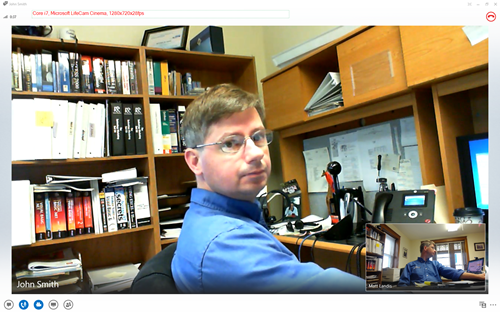
As soon as you fire up the c930e you will notice it delivers brilliant, natural colors and crystal clear video without tweaking. This is powered by a true 3MP optical resolution that can do up to 1080p at 30fps. (dependent on PC)

Below is a quick video using the c930e

Preview Comparison
preview-c930epreview-lifecam-cinemapreview-integrated

HD 1280x720x38fps Video Comparison

Logitech C930e

comparison-c930e-capability

Microsoft LifeCam Cinema

comparison-lifecam-capability

Thinkpad 520w Integrated Camera

comparison-integrated-capability

Stereo Microphone

Considering other interesting features on the c930e, it might get lost on users that this webcam has built-in stereo speakers.

The c930e is fitted with stereo microphones.
image

Below is a MP3 demonstrating that indeed the c930e does have stereo microphones:
https://dl.dropboxusercontent.com/u/5080904/c930e-audiotest.mp3

Can Lync take advantage of stereo audio? I never paid much attention before, but yes, Lync can take advantage of stereo audio just make sure the below:

image

Fit and Finish

Logitech seems to have put thought each aspect of the c930e’s fit and finish: From the overall device weight/balance, to various rubberized surfaces that make it feel good in the hand, to an excellent (one of the best?) monitor mounting brackets that includes just the right stiffness in the hinges, rubberized grips and weight so it mounts on your monitor very nicely. The included removable privacy shade is no exception to this nice fit and finish.

  • Feels quality
  • Carl Zeiss

Get a view of the standard camera mounting and various “rubberized” surfaces that make the c930e feel great as you handle it.

IMG_20130705_153549

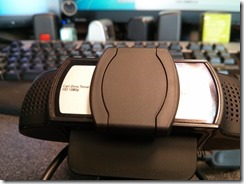
Front view: there is a clear plastic protecting the lense and encompassing the silver area.

IMG_20130705_153631

Notice the various adjustable rubber grips that make the c930e mount firmly on your monitor.

IMG_20130705_153616

The back of the c930e.

IMG_20130705_153657

Physical Privacy Shade

Considering webRTC and NSA developments recently I suspect  hardware privacy shades will become only more important in addressing concerns. (I’m taking no political positions here, just noting facts. :-)

The mechanical privacy shutter is not a quick after thought but a quality built accessory that can be removed but is included with the c930e. If you notice (below) the shutter hinge is not “cheesy” creased plastic, but a metal pin designed to last and operate smoothly for business environments.

Privacy shade hinge and in open position
IMG_20130708_105214

Privacy shade closed
IMG_20130708_112104

Privacy shade removed
IMG_20130708_112217

NOTE: Interestingly the c930e nicely covers the integrated camera on my Thinkpad W520. Not sure if this is designed, but nice unintentional security feature if not.

Software and Drivers

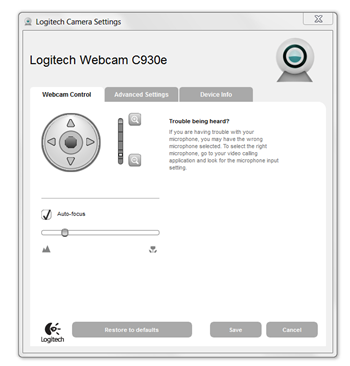
The c930e requires no drivers or software to be installed to use the device which makes for very quick, no-hassle setup. If you want additional control of the camera you can install the Logitech Camera Settings application (LogiCamSettings.exe) available free on Logitech’s website. The download is just a couple of MB’s and installs a shortcut on the desktop (not windows menu)

The Webcam Control tab controls digital Zooming, Autofocus and Macro/Landscape settings. The digital zoom setting is especially useful to have c930e on top of monitor or laptop and yet frame you nicely. (There is a Tilt/Pan control which works but only when the c930e is zoomed in)
image

Digital zoom fully zoomed in
image

zoomed out
image

Advanced settings tab allows image quality tweaksimage

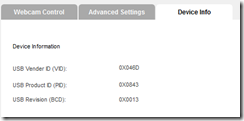
Device Info

image

Video First Impression Review


Summary & Observations

The Logitech c930e is the very first Lync Optimized UVC 1.5 H264 encoding camera on the market. While some new gadgets have tech specs without good design the c930e includes both and is physically one nicely designed unit. You should make yourself aware of PC spec’s required to do Super HD video and encoding offloading, but if you do you could see 40% CPU savings around encoding video. The optics and video quality is brilliant and crisp and the overall design, monitor mount and privacy shade is business quality.

<end>


Official Logitech WebPage:
http://www.logitech.com/en-us/product/webcam-c930e-business
http://logitech-en-amr.custhelp.com/app/answers/detail/a_id/39606

Other resolutions:

Lync 2013 and Windows 7/i5 4 CPU –16% Partial Screen (sending 424x240, receive 960x540), FullScreen 30% (sending 1280x720 15fps, receive 960x540)

Lync 2013 and Windows 8/i3 CPU – 9% Partial Screen (sending 424x240, receive 960x540), FullScreen 18% (sending 1280x720 15fps, receive 960x540)

not 1920x1080 but actually 1280x720 @ 15fps?
http://forums.logitech.com/t5/Video-Chat-Applications-Non/C930e-with-Lync-2013/td-p/1051973

More on c930e (see comments)
http://blog.schertz.name/2013/05/hd-video-lync-2013/

Skype Video Requirements:
https://support.skype.com/en/faq/FA597/what-do-i-need-to-make-a-video-call

Large Enterprise Voice Rollouts

imageInterested in Lync implementations that include a large number of Voice  users?

Below is a list of large Enterprise Voice installs. We’d be glad to hear about your Lync install with a large number of enterprise voice users. Post in the comments or contact me on twitter @matthewlandis

Company

Total Users

EV Users

Call Center

Case Study

Shell

90,000

~125,000

n/a

Click Here

CommonWealth Bank AU  

32,000


Click Here

AstraZeneca  

25,000


Click Here

LA Fitness  

25,000


Click Here

Sprint

40,000

19,000

Max ACD

Click Here

University of Illinois

~30,000

+15,000


Click Here

Swisscom  

15,000


Click Here

Dell

100,000

13,000*


Click Here

SAP


+8,000


Click Here

MWH Global  

8,000

ICE HelpDesk

Click Here

South Ayrshire Council

4,228

4,228


Click Here

London Borough of Enfield


3,000


Click Here

Marquette University

11,500

2,500


Click Here

RedWing Shoes

2,100

2,100*

Max ACD

Click Here

SINTEF


~2,000


Click Here

BancTec


1,200

PraireFyre

Click Here

* planned deployment
~ approximately

Thanks to https://twitter.com/itommyclarke for all the help with this list.